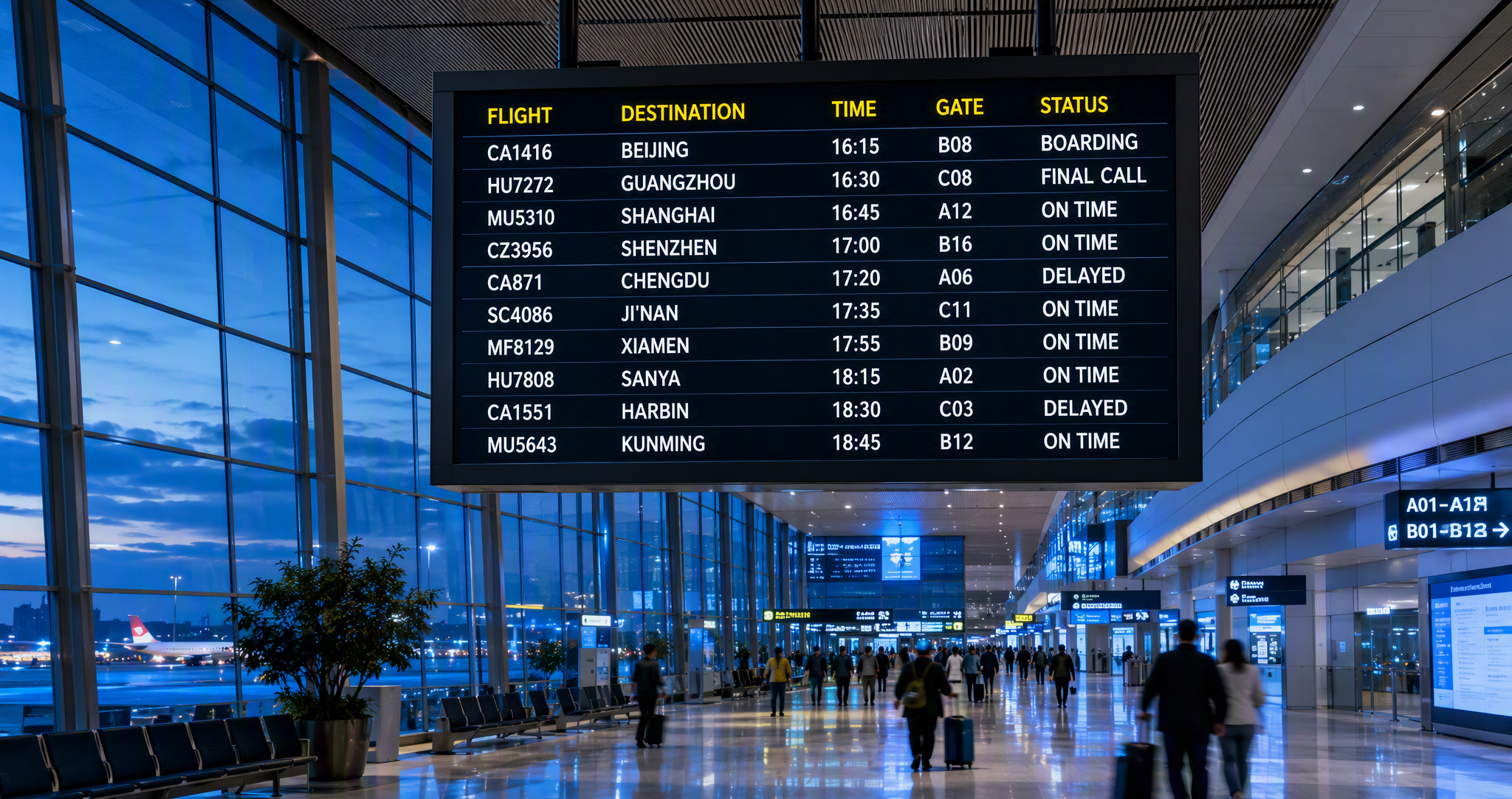
Flight Information
Display System (FIDS)
A field-proven, airport-grade platform that publishes real-time flight information to every screen in your terminal — departure and arrival boards, check-in counters, gate displays, baggage claim, LED walls and more — with centralized monitoring, remote control and a WYSIWYG template designer.
System Overview
The Flight Information Display System is the window through which an airport communicates with its passengers — and a critical link in keeping passenger flow smooth and operations safe.
FIDS automatically controls every display screen across the terminal, responds to flight dynamics in real time, and publishes accurate, timely information to passengers and staff. It pushes passenger notices, emergency announcements and operational guidance, helping travelers complete check-in, waiting, boarding and baggage claim — and helping the airport keep running normally.
The system covers the full chain from data source to screen: flight data is acquired from external interfaces (air-traffic message feeds, the airport operational database or a flight-maintenance console), processed by the application server, and distributed to display terminals that render purpose-built templates for each zone of the terminal.
What the System Delivers
Real-Time Flight Publishing
Flight changes flow from the data source to every screen in seconds. Departure, arrival, check-in, gate and baggage displays all update automatically as flight status evolves.
One Console for Every Device
A unified device-management console configures, monitors and remotely controls all hosts, programs, display pages and screens — from a single Windows-based operator workstation.
WYSIWYG Template Designer
Operators lay out display pages visually with drag-and-drop components — labels, text, images, video, clocks, weather and notifications — no programming required.
Universal & Dedicated Devices
Drives TFT-LCD, LED video walls and TVs with pixel-accurate rendering, and controls vendor-specific LED strip boards, large LCD walls and baggage input terminals through their native protocols.
Health Monitoring & Alerts
A lightweight agent on every terminal reports host health (CPU, memory, disk, TCP/IP links), program and page status to a status server, giving the operations team a live, color-coded view of the whole system.
Role-Based Security
User and role management controls who can edit templates, control devices, publish pages or send notices — with full logging for audit.
System Architecture
FIDS consists of a network hardware layer and a software layer. Hardware includes the database server, core FIDS servers, LED/LCD screens and industrial control hosts; software is organized into the flight-data interface, the core display system and flight-data management. Together they complete the full pipeline from data acquisition to distribution and display.
Two-Tier Terminal Distribution
Display terminals are organized into communication groups. The group leader keeps persistent TCP/IP connections with the application server and with its members; it receives XML flight messages from the server and fans them out to group members. Members keep a single connection to their leader — a topology that scales to hundreds of screens without overloading the core servers.
Each terminal parses the incoming template messages, applies its own filtering rules to select the flights relevant to its zone (check-in hall, gate, baggage claim …), and renders the bound display template with live data.
Core Modules
SmartClient — The Terminal Agent
SmartClient is a lightweight background service installed on every management station and display terminal. It communicates with the status server over TCP/IP, exchanges control and status messages, responds to remote operator commands in real time, and keeps display software up to date.
| Capability | Item | Detail |
|---|---|---|
| Status Reporting | Host status | CPU, memory, TCP/IP connections and disk utilization |
| Program status | Running state of every managed application | |
| Page status | Display state of every rendered page | |
| File Updates | Remote update | Responds to remote file-management update commands and reports download progress |
| Control Response | Host control | Responds to host API shutdown commands |
| Program control | Responds to program start / stop commands | |
| Page control | Responds to page run / stop commands |
Device Management Console
The Device Management Console is the core management module of FIDS: unified configuration, remote monitoring and centralized control of all devices and software, through a friendly standard Windows interface. Its capabilities fall into three areas: device data maintenance, device monitoring and device control.
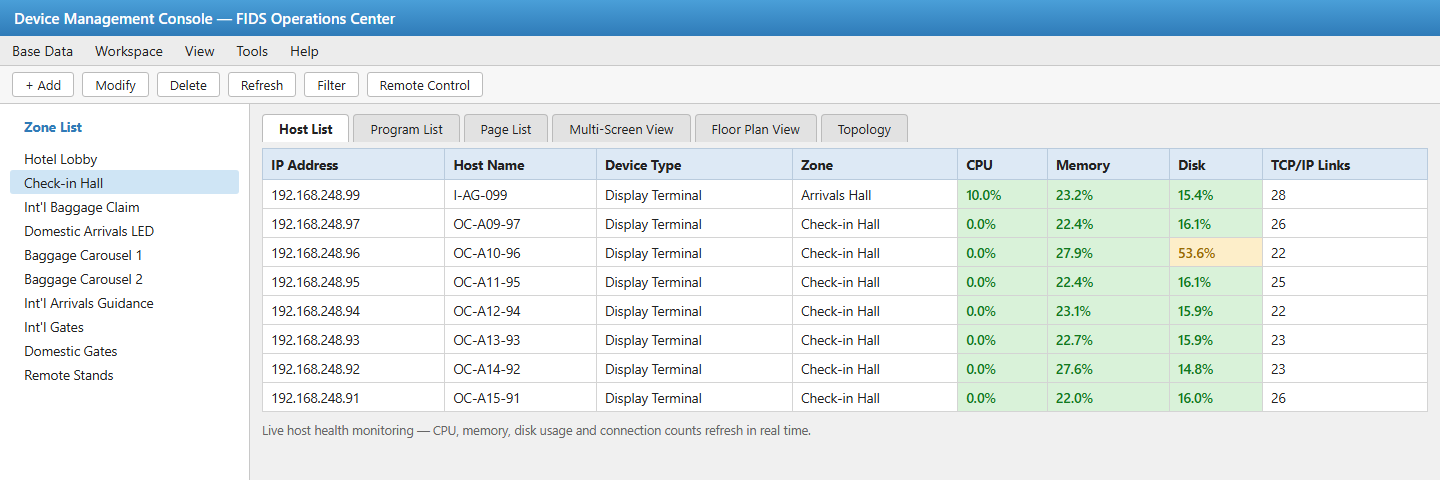
- ▸Base data — device types, zones with floor plans, communication groups and device details
- ▸Monitoring views — topology, multi-screen and floor-plan views, plus tree views by type and zone
- ▸Management lists — hosts, programs, pages and notices, with full maintenance functions
- ▸Notifications — create and publish passenger notices to selected screens
Template Designer — WYSIWYG Page Composition
The Template Designer is where every passenger-facing screen is born. Operators create, modify and delete display pages in a standard Windows graphical editor, arrange components visually, and preview the page exactly as passengers will see it — what you see is what you get.
- ▸Component library — label, text, image, video, container, clock, notification and weather components
- ▸Layout tools — left/right/top/bottom alignment, equal width/height, even vertical/horizontal spacing
- ▸Productivity — quick-build wizard, undo/redo, multi-template editing, save / save-as / local export
- ▸Page management — create, edit, delete and preview pages bound to terminal filtering rules
- ▸Color configuration — per-status colors for flight states (boarding, final call, delay, cancellation, diversion, return …) with defaults and one-click restore
- ▸Live data binding — pages bind to flight fields so content refreshes automatically
User & Rights Management
A dedicated console provides user management and role management. A role corresponds to a position; a user is the person holding that position. Role permissions span system functions, templates, display terminals, pages and notifications — so the airport can separate duties between operators, content editors and administrators. All operations are prompted on screen and recorded in logs.
Flight Information Management Console
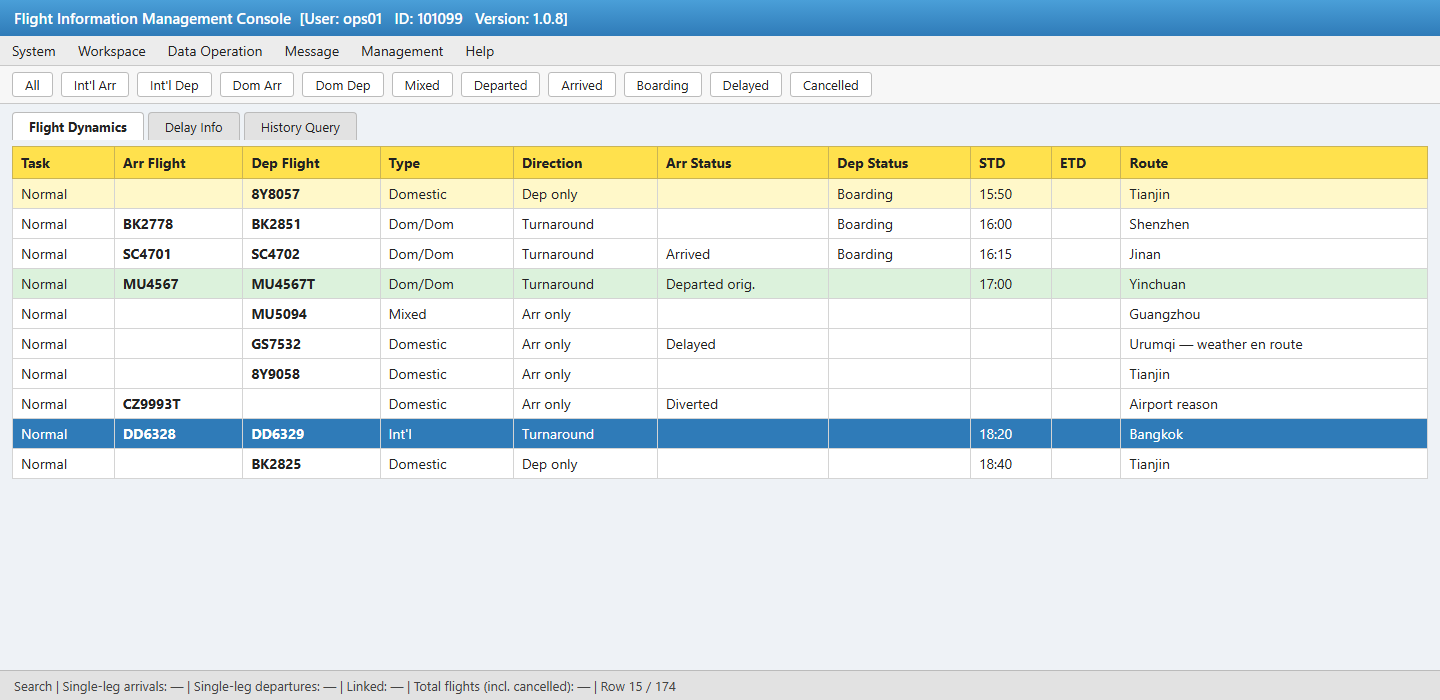
The operations console gives controllers a real-time flight dynamics view: arrival and departure flights, turnaround links, flight attributes and direction, arrival/departure statuses and irregularities with causes, plus plan times, estimates and actuals. Filters, counters and color rules help staff focus on the flights that need attention.
Display Terminals
General Display Terminals
General display terminals drive WYSIWYG devices — TFT-LCD screens, LED video walls and TVs. Each terminal belongs to a communication group: the leader keeps persistent TCP/IP connections to the application server and to all group members, receives messages from the server and distributes them; members keep a single connection to the leader and receive messages from it. Terminals parse template messages, filter the flight data their screen needs, and render the bound display template.
- ▸Leader maintains connections with the server and group members; members connect only to the leader.
- ▸Leader receives and fans out server messages; members render pages locally from the received data.
- ▸Per-terminal filtering rules ensure each zone shows only its relevant flights.
Dedicated Display Terminals
Dedicated devices — LED strip boards, large LCD walls and baggage input terminals — are published through vendor-defined control protocols. Control is split in two: the general display terminal software filters the flights that qualify for display and generates an XML data file; the dedicated device control software picks up the XML, formats it per the device protocol and drives the hardware, while a simulated preview shows operators exactly what the device is displaying.
Baggage input terminals go one step further: besides displaying flight information, they capture staff operations and report first-bag and last-bag events back to the database — closing the loop between the ramp and the arrivals hall.
Passenger-Facing Displays
Every display template is designed for its location and reading distance. Below are representative English layouts produced by the Template Designer and rendered by display terminals.
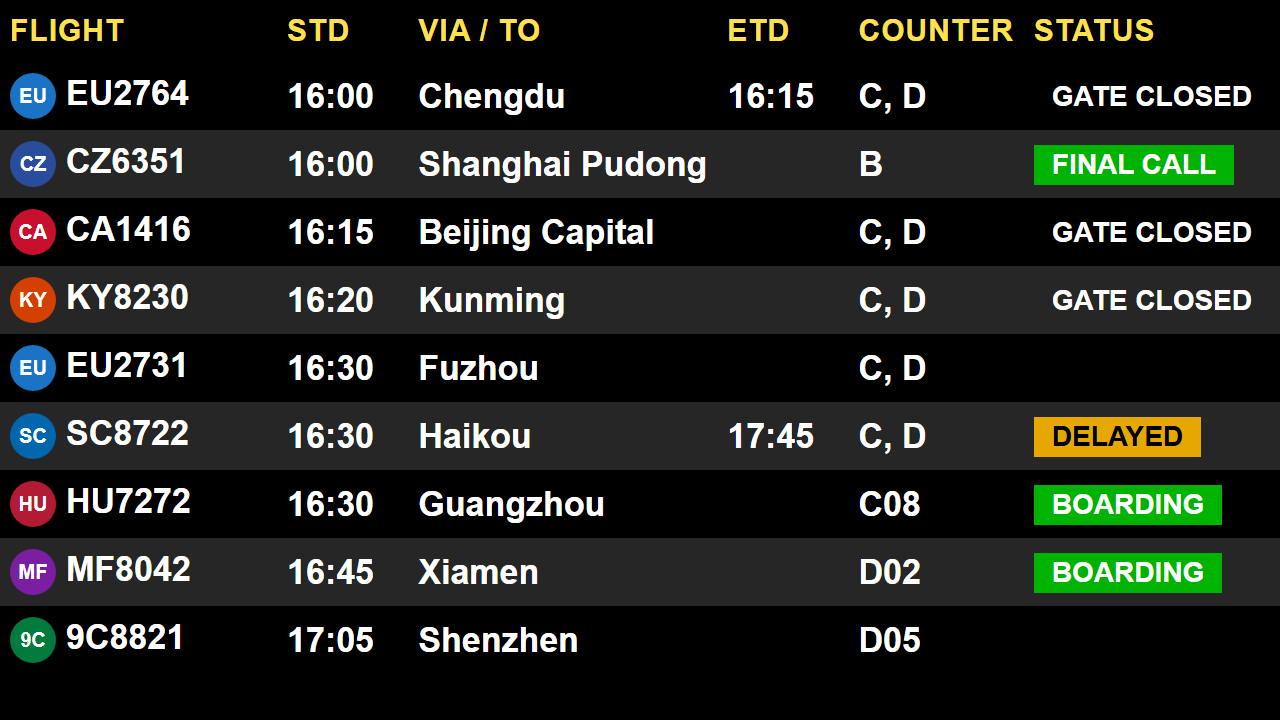
Departure Board
Flight, scheduled and estimated times, destination, check-in counters and color-coded status (BOARDING, FINAL CALL, DELAYED, GATE CLOSED).
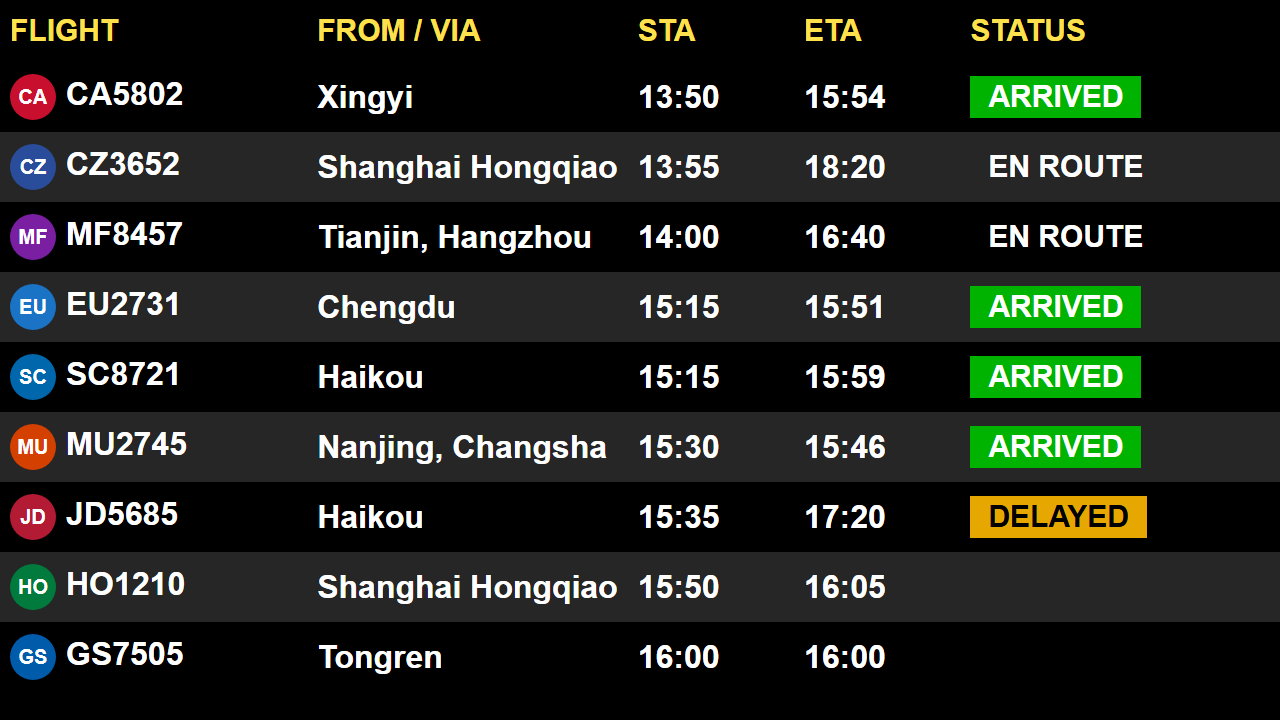
Arrivals Board
Flight, origin/via, scheduled and estimated arrival times, and live status.
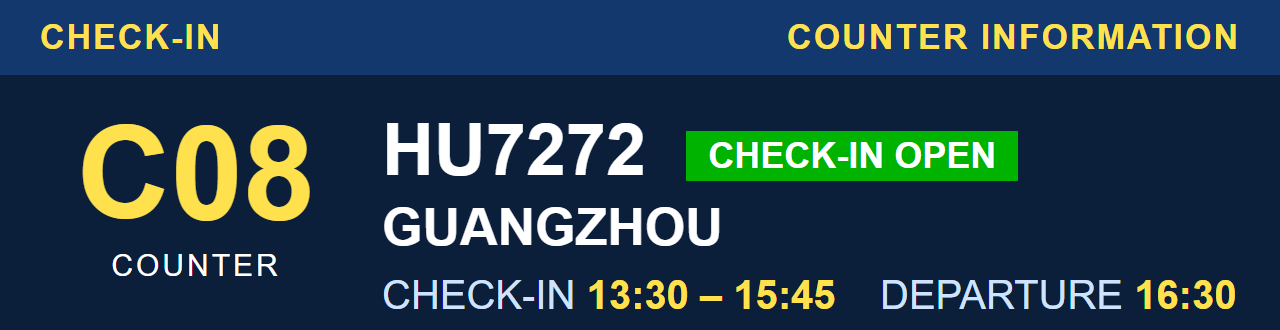
Check-in Counter Display
Counter number, flight, destination, check-in window and departure time.
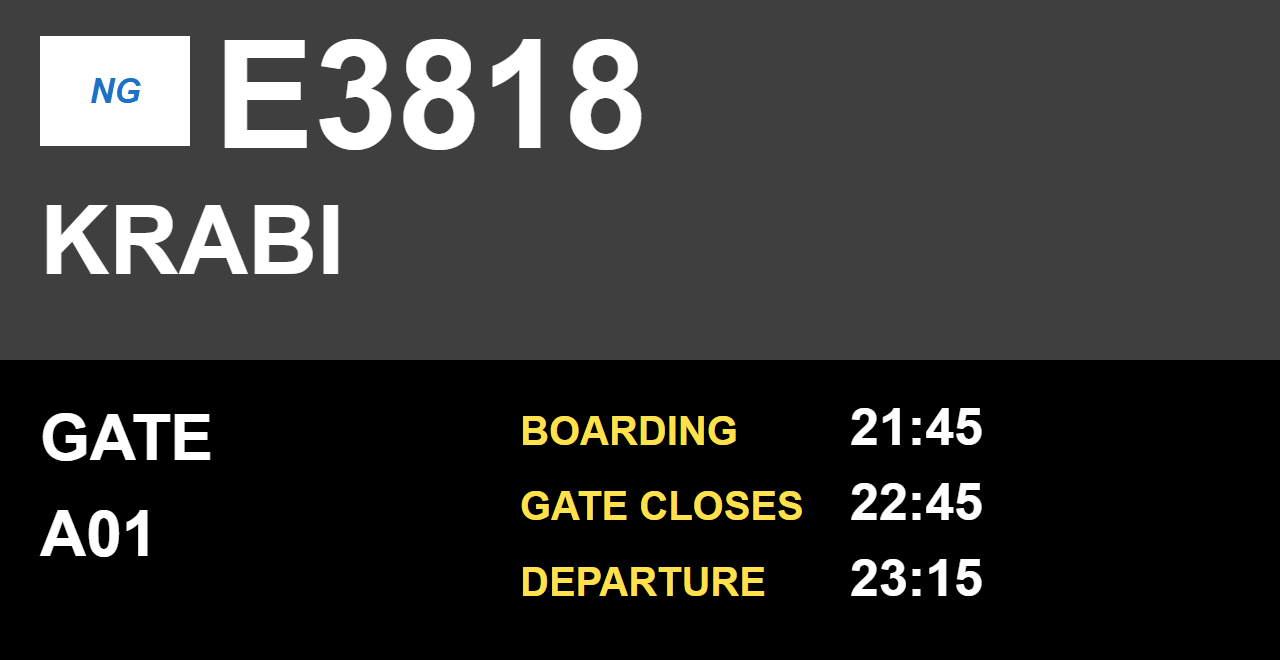
Gate Information Display
Airline, flight number, destination, gate, boarding window and departure time.
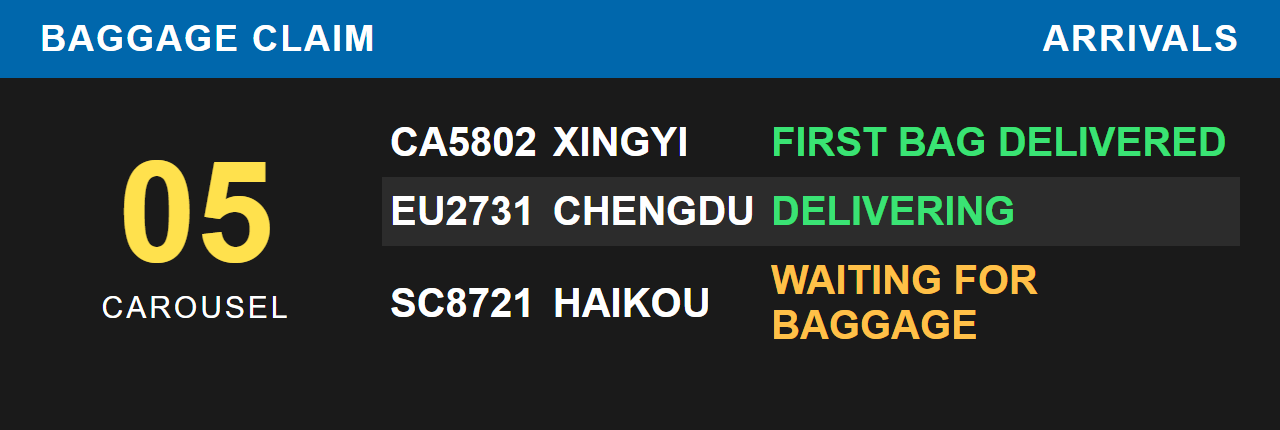
Baggage Claim Display
Carousel assignment and live belt status, fed by baggage input terminal events (first bag / last bag).
Key Data Flows
1 · Flight Information Processing
2 · Status & Log Monitoring
3 · Device Control
Six control modes are supported, each with its own processing pipeline and executing module — all issued from the Device Management Console and executed by SmartClient on the target host:
| Control Mode | What It Does |
|---|---|
| PLC Control | Switches display power circuits through PLC controllers |
| API Shutdown | Graceful operating-system shutdown of terminal hosts |
| Wake-on-LAN | Powers on terminal hosts over the network |
| Program Start / Stop | Starts and stops display or control programs remotely |
| Page Start / Stop | Runs or halts individual display pages |
| Screen Control | Controls display panels (on / off, signal source) |
4 · Terminal Display Processing
- ▸General terminals render display templates filled with live flight data.
- ▸Dedicated terminals export XML data to the control software driving vendor-protocol hardware.
- ▸Baggage input terminals report first-bag / last-bag events back to the database.
Deployment Scenarios & Coverage
One System, Every Screen in the Terminal
- ▸Arrivals display screens
- ▸Departures display screens
- ▸Check-in counter displays
- ▸Departure screens with gate information
- ▸Departure screens with counter information
- ▸Baggage carousel displays
- ▸Gate information displays
- ▸Departure reminder screens
- ▸Arrival reminder screens
- ▸Combined arrival / departure screens
- ▸Fixed-point arrival / departure screens
- ▸Fully custom layouts for special zones
Why Airports Choose Our FIDS
Proven in Operation
Deployed and refined in live airport environments, covering check-in halls, gates, arrivals and baggage claim with domestic and international traffic.
Open Integration
Standard interfaces to ATC message feeds and the airport operational database; vendor protocols for dedicated LED/LCD hardware.
Operate It Yourself
Visual template design, color rules, filtering and notice publishing are all in the hands of your operations team — no vendor ticket needed for daily changes.
Built-In Resilience
Two-tier communication groups, health monitoring on every host, remote power and program control keep screens alive around the clock.
Ready to modernize your terminal displays?
Taichoo Aero provides end-to-end delivery: requirement analysis, template design, hardware adaptation, on-site deployment, training and long-term operation support. Multilingual display content (English / local language) is supported out of the box.